![911C logo 2-4.png]](https://knowledge.911cellular.com/hs-fs/hubfs/911C%20logo%202-4.png?height=20&name=911C%20logo%202-4.png)
The Computer Panic Button - CPB - sticker is a printed emergency-instruction label that carries the key sequence for the software panic button (for example, press and hold Alt + Backspace). It is applied to a keyboard, keyboard tray, or monitor at the workstation.
This guide covers how to disinfect the label safely as part of cleaning that surface, and how to keep it readable — because it is emergency instructions, legibility is a safety matter, not a cosmetic one.
What the sticker looks like
There are two versions — the key sequence differs by operating system. Match the sticker to the workstation’s computer.
|
WINDOWS |
MAC |
|
|
|
|
Press & hold Alt + Backspace |
Press & hold Option + Delete |
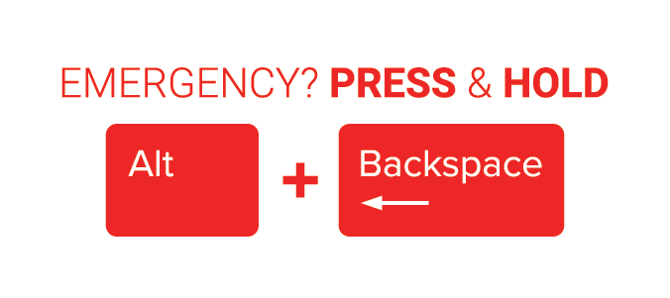
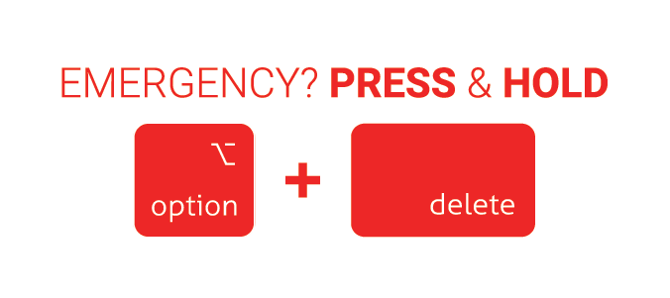
|
Two jobs: disinfect it, and keep it readable The label sits on a surface your team already cleans, so no separate protocol is needed — just disinfect the label along with the keyboard or monitor. The second job is unique to this label: if the printing ever becomes faded, smudged, or peeled, staff may not be able to read how to trigger an emergency. A label that can’t be read must be replaced right away. |
HOW TO DISINFECT THE LABEL
The label is a noncritical surface — touched but not in contact with mucous membranes or non-intact skin. Clean it and disinfect it the same way, and on the same schedule, as the keyboard or workstation it lives on, using your facility’s standard product.
- Use your facility’s standard disinfectant. An EPA-registered hospital disinfectant wipe — quaternary ammonium ("quat") or improved hydrogen peroxide — is ideal and is gentle on the label. 70% isopropyl alcohol is fine for spot cleaning.
- Clean, then disinfect. Wipe to remove visible soil first, then wipe again to disinfect, using light mechanical action across the face of the label.
- Keep it wet for the label’s contact time. Let the disinfectant stay visibly wet for the full time on the product label (commonly 1–4 minutes), then air-dry.
- Wipe across the label, not at its edges — wiping into an edge lifts the corner over time and shortens the label’s life.
|
Avoid these on the label No abrasive pads, scouring powders, or acetone — they scratch or dissolve the print. Avoid routine bleach on the label; repeated bleach is the harshest thing for printed ink and adhesive, so reserve it for when facility policy requires it (e.g., C. difficile or a blood/body-fluid spill), and wipe with water or 70% alcohol afterward to clear residue. Never scrub hard enough to abrade the printing. |
|
Protect the keyboard underneath If the label is on a keyboard, follow your facility’s keyboard-cleaning method: apply the disinfectant to the wipe or cloth (never pour or spray liquid directly onto the keys), and don’t let liquid run between keys. The label itself needs no special handling beyond wiping across it. |
READABILITY IS A SAFETY CHECK
Because this label tells staff how to trigger an emergency, a worn label is a safety risk. Build a quick look into routine cleaning: while you disinfect it, confirm you can still read it.
- Can you read the full instruction and key sequence at a glance, from where a person would stand?
- Is the print sharp — not faded, smudged, or worn from cleaning?
- Is the label flat and fully stuck down — no lifting corners, cracks, or trapped grime?
|
Replace immediately if the label is compromised If the label is faded, smudged, peeling, cracked, or unreadable for any reason, replace it right away — don’t wait for a scheduled refresh. Until it’s replaced, make sure staff at that workstation know the emergency key sequence another way. A workstation with an unreadable emergency label should be treated as a gap to close, not a cosmetic to-do. |
Label material & ordering.
CPB labels use durable polyester-based facestock built to survive repeated hospital disinfectant wipe-downs without fading or lifting. Order replacements through Support@911Cellular.com; for the exact material spec or a cleaning-compatibility statement for your records, contact your 911Cellular Client Success representative.
This guide reflects CDC / HICPAC recommendations for cleaning and disinfecting noncritical surfaces. It is general guidance to be used together with your facility’s infection-prevention policy and the disinfectant manufacturer’s instructions for use, and is not a substitute for either. 911Cellular · 2026