![911C logo 2-4.png]](https://knowledge.911cellular.com/hs-fs/hubfs/911C%20logo%202-4.png?height=20&name=911C%20logo%202-4.png)
Automated Weather Alerts allow organizations to automatically notify your List Recipients of National Weather Service (NWS) events occurring within a predefined geofence. Unlike standard systems that broadcast every NWS notification, this Event-Based feature allows Administrators to filter for specific events (e.g., Extreme Cold vs. Winter Weather Advisory), ensuring your recipients only receive relevant alerts.
Settings > Mass Notification System > Automated Weather Events
Event-Based Selection (Advanced Settings)
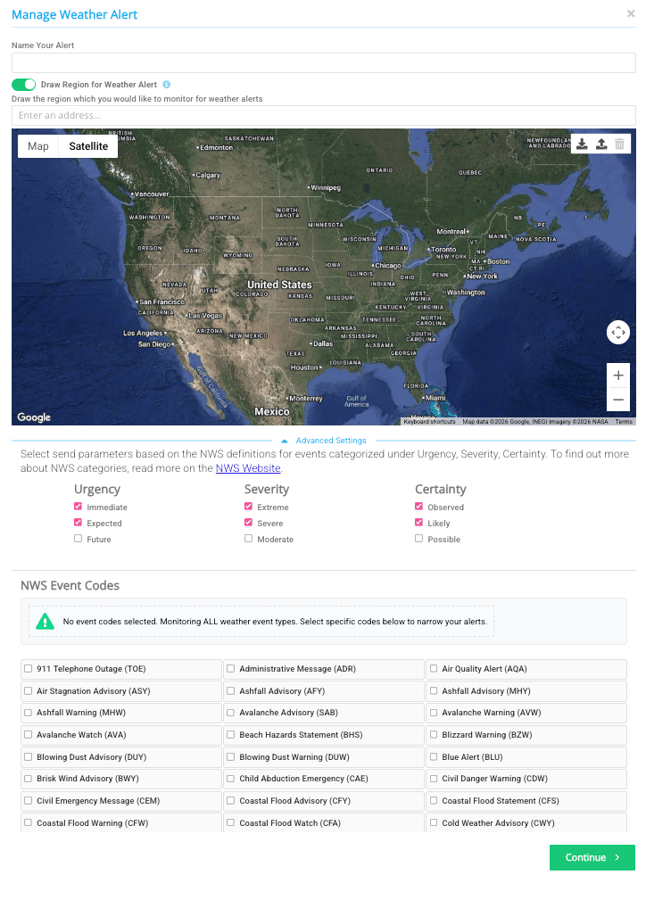
To prevent "alert fatigue," use the Event-Based mapping tool to choose exactly which NWS triggers should activate your notification:
-
Locate the Advanced Settings section within the alert configuration.
- Select your desired Urgency, Severity, and Certainty levels. (We recommend the top two boxes checked, reference the screenshot above)
-
Under NWS Event Codes, select the specific NWS categories you wish to track. Examples include:
-
Cold Hazards: Cold Weather Advisory, Extreme Cold Watch.
-
Visibility/Wind: Blowing Dust Warning, High Wind Warning.
-
Severe Weather: Tornado Warning, Severe Thunderstorm Watch.
-
-
You can map multiple NWS events to a single 911Cellular alert, or create separate alerts for different event types.
Configure Recipients and Delivery
-
Methods of Sending: Select your preferred delivery channels (e.g., SMS, Email, Desktop Takeover, or App Push Notification).
-
Recipients: Choose the specific users or groups who should receive these automated updates.
-
Save: Click Save to activate the automated weather monitor.
A note about CAP Urgency, Severity, and Certainty
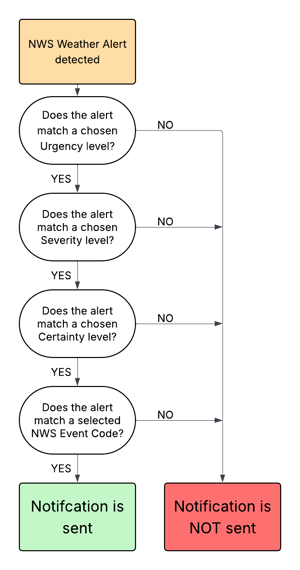
For an automated weather notification to be distributed, the incoming NWS CAP alert must match both the selected Event Code(s) and the configured Urgency, Severity, and Certainty levels.
For example, if a user selects the Tornado Warning Event Code but configures Severity as Severe only, a Tornado Warning received with a Severity of Extreme will not trigger a notification.
To ensure alerts are delivered as expected, users should carefully review and select all applicable Urgency, Severity, and Certainty levels that correspond to the NWS alerts they wish to receive.
Technical Notes
-
NWS Source: Automated notifications are currently driven exclusively by official National Weather Service (NWS) data.
-
Precision Control: Notifications are only triggered when an NWS event overlaps with your custom-drawn polygon.
-
Frequency: Once saved, the system monitors NWS feeds 24/7—no manual intervention is required to send the alerts.